Hi,
In some cases (such as the "Page Content" field found under the Page Layout columns) it is not possible to delete a field from your list once you have added it. This is because by default some fields have their property set to Sealed="TRUE". Thus, you will not be able to delete the field via the UI, forcing you to use a coding solution. This can be achieved via the following PowerShell script:
Clear-Host
$web = Get-SPWeb http://yourweburl
$list = $web.Lists["YourListName"]
$field = $list.Fields["Page Content"]
$field.AllowDeletion = $true
$field.Sealed = $false
$list.Update()
$field.Delete()
$list.Update()
$web.Dispose()
Tuesday, March 17, 2015

Friday, February 20, 2015
SQL snippet which shows the progression of a database shrinkage operation
SELECT
    Percent_Complete [Completed],
    Start_time [Start Time],
    Status,
    Command,
    ((estimated_completion_time/60000)) [ETA (Min)],
    ((cpu_time/60000)) [CPU Time (MIN)],
    ((total_elapsed_time/60000)) [Total Elapsed Time (MIN)]
 FROM
    sys.dm_exec_requests
WHERE
    command = 'DbccFilesCompact'
Wednesday, January 7, 2015
Full Postback Problem With AJAX in SharePoint 2013 Visual WebPart
Hi,
For months I have been battling a postback problem occurring in a visual webpart. I have a bunch of controls (dropdowns, textboxes) which are selected by the user to specify search criteria. If the user then hits the search button, a grid will be refreshed based on the selected parameters. The controls are AJAXified via RadAjaxManager, so that the calls are made asynchronous, preventing unnecessary full page postbacks. Just to go on a sidetrack here: if you encounter your SharePoint webpart doing a first full postback and then functioning fine with the controls AJAXified, you might wanna check how you set things up. The way to go is by dynamically adding an instance of RadAjaxManager and the AjaxSettings to the webpart (NOT the WebPartUserControl!). You can find more information on how to do that right here: http://www.telerik.com/forums/telerik-ajax-issue-with-sharepoint-2010. If you are still struggling, feel free to contact me and I'll try to help you out.
Ok. This seemed to work fine until I would leave the page idle for about two minutes. If the user would then trigger any asynchronous callback, the page would cause a full postback, consequently discarding all search parameters specified. The weird thing is that in IE this happened intermittently, maybe just once in every 500 requests. For Chrome/FireFox it would always happen after about 120 seconds.
I have been digging into the Distributed Cache service and doing all sorts of funky tweaking such as changing the Logon and ViewState cache request timeouts but it did not help a bit. Even after re-installing and even disabling the DCS (which tremendously sped up the page request time btw) the problem persisted.
In October, someone created a ticket with Microsoft for this issue and they stated that it had been fixed in the December CU (http://support2.microsoft.com/kb/2910943)
Now it appears that this hotfix is for foundation (thus not for Server, which we are using).
The only and only working solution for now is to disable Forms Authentication in IIS for the web application where you are using your visual webpart. I have done that just now and solved the problem. Beware that doing this might cause trouble if that web application is being used as a portal.
I hope this helps you for now. Keep an eye out for the Server CU.
-Gary
Thursday, October 16, 2014
How to close a layouts page loaded in an SPModalDialog from server side
ASP:
// In _layouts\YourSolution\dialogpage.aspx:
C#:
A small gotcha I ran into is that I had the btnSaveAndClose control Ajaxified, which caused it to throw exceptions such as:
"0x800a1391 - JavaScript runtime error: 'Sys' is undefined"
and
"0x800a1391 - JavaScript runtime error: 'ULSSendExceptionImpl' is undefined"
// In _layouts\YourSolution\dialogpage.aspx:
<asp:Button ID="btnSaveAndClose" runat="server" OnClick="btnSaveAndClose_Click" />
C#:
protected void btnSaveAndClose_Click(object sender, EventArgs e)
{
    // code logic before closing the dialog
    // ..
    // ..

    string script = @"window.frameElement.commonModalDialogClose(1, '');";
    ScriptManager.RegisterClientScriptBlock(this, this.GetType(), "Close", script, true);

    // alternatives for the script variable are:
    // string script = @"window.frameElement.commitPopup();";
    // string script = @"window.frameElement.cancelPopUp();";

    // NOTE: use RegisterStartupScript when executed from .ASCX/webpart:
    // ScriptManager.RegisterStartupScript(Page, Page.GetType(), "Close", script, true);
}
A small gotcha I ran into is that I had the btnSaveAndClose control Ajaxified, which caused it to throw exceptions such as:
"0x800a1391 - JavaScript runtime error: 'Sys' is undefined"
and
"0x800a1391 - JavaScript runtime error: 'ULSSendExceptionImpl' is undefined"
Thursday, May 15, 2014
RadGrid duplicate insert after page refresh
Hi guys,
Here's a quick one. I had a problem with a RadGrid I created for an application page the other day. It's a common known problem in the ASP.NET community and I saw several solutions but there is a very simple one to it. Let me explain the issue first. Whenever I would insert/update/delete a record using the grid and I would refresh the page, the application would fire that event again. This could potentially cause duplicate inserts or exceptions being thrown whenever trying to delete a record that does not exist anymore.
It is a classic problem.
The easiest way to get passed this hurdle is to do a redirect after the post. It is up to you to decide whether to redirect the users to, say, a confirmation/thank you page or to the same page.
As for the latter, add the following at the end of your grid event logics:
After your updates have been made, the page will redirect to itself and prevent the event from firing again.
Here's a quick one. I had a problem with a RadGrid I created for an application page the other day. It's a common known problem in the ASP.NET community and I saw several solutions but there is a very simple one to it. Let me explain the issue first. Whenever I would insert/update/delete a record using the grid and I would refresh the page, the application would fire that event again. This could potentially cause duplicate inserts or exceptions being thrown whenever trying to delete a record that does not exist anymore.
It is a classic problem.
The easiest way to get passed this hurdle is to do a redirect after the post. It is up to you to decide whether to redirect the users to, say, a confirmation/thank you page or to the same page.
As for the latter, add the following at the end of your grid event logics:
Response.Redirect(Request.Url.AbsoluteUri);
After your updates have been made, the page will redirect to itself and prevent the event from firing again.
Tuesday, April 29, 2014
Adding, updating and deleting SPListItems using the SharePoint list webservice in combination with XDocument
Quick code snippet which does the following:
- generates a Batch element of type XDocument (i choose for XDocument rather than XmlDocument because it makes it so much simpler to build up the document
- converts the XDocument object to an XmlDocument using an XmlReader
- generates a Batch element of type XDocument (i choose for XDocument rather than XmlDocument because it makes it so much simpler to build up the document
- converts the XDocument object to an XmlDocument using an XmlReader
XmlDocument doc;

XDocument xDoc = new XDocument(
    new XElement("Batch", new XAttribute("OnError", "Continue"),

        // Add new item
        new XElement("Method", new XAttribute("ID", "1"), new XAttribute("Cmd", "New"),
            new XElement("Field", "test0", new XAttribute("Name", "Title")),
            new XElement("Field", "Update", new XAttribute("Name", "UserAction")),
            new XElement("Field", "(GAR-2313)", new XAttribute("Name", "OldValue")),
            new XElement("Field", "(SWX-9582)", new XAttribute("Name", "NewValue"))
        ),

        // Updates item: set column 'ProjectStatus' with value 'CLOSED' for item with ID 4
        new XElement("Method", new XAttribute("ID", "2"), new XAttribute("Cmd", "Update"),
            new XElement("Field", "4", new XAttribute("Name", "ID")),
            new XElement("Field", "CLOSED", new XAttribute("Name", "ProjectStatus"))
        ),

        // Delete items with ID 11 and 17
        new XElement("Method", new XAttribute("ID", "3"), new XAttribute("Cmd", "Delete"),
            new XElement("Field", "11", new XAttribute("Name", "ID"))),
        new XElement("Method", new XAttribute("ID", "4"), new XAttribute("Cmd", "Delete"),
            new XElement("Field", "11", new XAttribute("Name", "ID")
            )
        )
    )
);

using (XmlReader xmlReader = xDoc.CreateReader())
{
    doc = new XmlDocument();
    doc.Load(xmlReader);
}

// assuming a web reference called 'ListWebService' is present..
using (ListWebService.Lists listsWebSvc = new ListWebService.Lists())
{
    //This passes the default user credentials of the user to the web service system
    listsWebSvc.Credentials = System.Net.CredentialCache.DefaultNetworkCredentials;

    // replace '_listWebSvcUrl' with the url of your list
    listsWebSvc.Url = _listWebSvcUrl;

    // replace '_listName' with the name of your list
    listsWebSvc.UpdateListItems(_listName, doc);
}
Sunday, April 13, 2014
Quick reference guide for formatting divs as tables
<!DOCTYPE html PUBLIC "-//W3C//DTD HTML 4.01//EN">
<html>
    <head>
        <style type="text/css">
            .containerButtons {
                width: 1200px;
                height: 40px;
                border-color: orange;
                border-style: solid;
                position: block;
            }
            .divButtonSection {
                width: 15%;
                height: 70%;
                border-color: blue;
                border-style: solid;
                float: right;
                position: inline-block;
                display: table-cell;
                vertical-align: middle;
            }
            .containerInformation {
                width: 1200px;
                height: 200px;
                border-color: grey;
                border-style: solid;
                display: block;
            }
            .divInformationTable {
                width: 24%;
                height: 95%;
                position: relative;
                border-color: green;
                border-style: dashed;
                display: inline-block;
                margin: 0px 0px 0px 0px;
            }
            .divInformationRow {
                width: 90%;
                height: 22%;
                position: relative;
                border-color: red;
                border-style: solid;
                display: block;
                margin: 0px 0px 0px 0px;
            }
            .divInformationHeaderCell {
                width: 96%;
                height: 90%;
                position: relative;
                border-color: black;
                border-style: solid;
                display: table-cell;
                margin: 0px 0px 0px 0px;
                float: left;
            }
            .divInformationCellLabel {
                width: 20%;
                height: 90%;
                position: relative;
                border-color: black;
                border-style: solid;
                display: table-cell;
                margin: 0px 0px 0px 0px;
                float: left;
            }
            .divInformationCellControl {
                width: 75%;
                height: 90%;
                position: relative;
                border-color: blue;
                border-style: solid;
                display: table-cell;
                margin: 0px 0px 0px 0px;
                float: left;
            }
        </style>
    </head>
    <body>
        <div class="containerInformation">
            <div class="divInformationTable">
                <div class="divInformationRow">
                    <div class="divInformationHeaderCell">
                        Dealer Information
                    </div>
                </div>
                <div class="divInformationRow">
                    <div class="divInformationCellLabel">
                        Label1
                    </div>
                    <div class="divCellControl">
                    Control1
                    </div>
                </div>
                <div class="divInformationRow">
                    <div class="divInformationCellLabel">
                        Label2
                    </div>
                    <div class="divCellControl">
                        Control2
                    </div>
                </div>
                <div class="divInformationRow">
                    <div class="divInformationCellLabel">
                        Label2
                    </div>
                    <div class="divCellControl">
                        Control2
                    </div>
                </div>
            </div>
            <div class="divInformationTable">
                <div class="divInformationRow">
                    <div class="divInformationHeaderCell">
                        Seller Information
                    </div>
                </div>
                <div class="divInformationRow">
                    <div class="divInformationCellLabel">
                        Label3
                    </div>
                    <div class="divCellControl">
                    Control3
                    </div>
                </div>
                <div class="divInformationRow">
                    <div class="divInformationCellLabel">
                        Label4
                    </div>
                    <div class="divCellControl">
                        Control4
                    </div>
                </div>
                <div class="divInformationRow">
                    <div class="divInformationCellLabel">
                        Label4
                    </div>
                    <div class="divCellControl">
                        Control4
                    </div>
                </div>
            </div>
        </div>
        <div class="containerButtons">
            <div class="divButtonSection">
                OK
            </div>
            <div class="divButtonSection">
                Cancel
            </div>
        </div>
    </body>

</html>
Wednesday, November 20, 2013
"Cannot perform this Operation. The file has been deleted or someone else has it checked out."
Hi all,
One of our clients ran into an issue which rendered her unable to edit/check out documents from MOSS. Whenever she would try to open a file, the following error message would occur:

lol @ the "Was this information helpful?". Of course it's not! Experience has proven me that often these type of err msgs are misleading as you'll find out in a moment. At first I thought it was a user rights permission issue on that document library but other people with the same rights had no problems editing. This is an indication that the problem might reside at the client and could be related to corrupted cached files. So next thing I did was check the Microsoft Office Upload Center for any pending files. Nothing.
Then I found out that some necessary add-on components were missing from her IE, in particular the 'SharePoint OpenDocuments Class'. This probably happened after an update. The way I solved it is as follows:
1. Go to 'Control Panel' -> 'Programs' -> 'Programs and Features'
2. Find the version of Office you're using, in my case it was 'Microsoft Office Professional Plus 2010'
3. Click the 'Change' button
4. From the menu, choose the 'Repair' option and click 'Continue'
Now this might take a minute of 10-15 and afterwards, it will prompt you to reboot. Do so and as soon as you're logged in again, check if the SharePoint addons are present in IE by:
1. Opening IE
2. Click 'Tools' (or ALT+X)
3. Click 'Manage Add-ons'
4. Change the 'Show' dropdown to 'All add-ons'
5. Sort by Name and verify if you see the various SharePoint add-ons, especially the 'SharePoint OpenDocuments Class'
Ciao!
One of our clients ran into an issue which rendered her unable to edit/check out documents from MOSS. Whenever she would try to open a file, the following error message would occur:
lol @ the "Was this information helpful?". Of course it's not! Experience has proven me that often these type of err msgs are misleading as you'll find out in a moment. At first I thought it was a user rights permission issue on that document library but other people with the same rights had no problems editing. This is an indication that the problem might reside at the client and could be related to corrupted cached files. So next thing I did was check the Microsoft Office Upload Center for any pending files. Nothing.
Then I found out that some necessary add-on components were missing from her IE, in particular the 'SharePoint OpenDocuments Class'. This probably happened after an update. The way I solved it is as follows:
1. Go to 'Control Panel' -> 'Programs' -> 'Programs and Features'
2. Find the version of Office you're using, in my case it was 'Microsoft Office Professional Plus 2010'
3. Click the 'Change' button
4. From the menu, choose the 'Repair' option and click 'Continue'
Now this might take a minute of 10-15 and afterwards, it will prompt you to reboot. Do so and as soon as you're logged in again, check if the SharePoint addons are present in IE by:
1. Opening IE
2. Click 'Tools' (or ALT+X)
3. Click 'Manage Add-ons'
4. Change the 'Show' dropdown to 'All add-ons'
5. Sort by Name and verify if you see the various SharePoint add-ons, especially the 'SharePoint OpenDocuments Class'
Ciao!
Wednesday, September 18, 2013
Failed trust relationship between workstation and primary domain
Hi,
This morning I restored a snapshot on my virtual machine which I took about six weeks ago. When I tried
to log on using my user account which is in the company domain, Windows confronted me with the following
login error:
"The trust relationship between this workstation and the primary domain failed".
Using the local administrator's account I was able to log on. So let's break down what actually happened
here.
The machine has a default setting in the registry which determines how often your machine will try to change its machine account password. This password is being used to secure a safe communication channel between the domain member and domain controller. In this channel information about authentication and authorization decisions are being transmitted, thus must be handled carefully.
So, what happened here is that after I took the snapshot, the machine account password was changed (this is done by the Netlogon service) and the new password had also been updated in the domain controller so everything was in synch. By restoring the snapshot, I got back the old password and this caused a mismatch between the domain member and the domain controller.
NOTE: This can be solved by removing the computer (or VM in this case) from the domain and then re-adding it.
Now, to prevent this from happening again, do the following:
1. Press Windows Logo Key + R
2. Type 'gpedit.msc' in the textbox and press Enter
3. Expand 'Computer Configuration' -> 'Windows Settings' -> 'Security Settings' -> 'Local Policies' -> 'Security Options'
4. Search for the policy called: 'Domain member: Disable machine account password changes'
5. Double-click it, change the setting to 'Enabled' and click 'OK'
This is obviously not the safest option to choose security-wise, however, in my case I'm dealing with a development machine so
I am cool with this.
Alternatively you can also choose to keep this option disabled and rather change the 'Domain member: Maximum machine account password age' and set it to a value of which you think is more suitable.
Hope this helps.
Later.
Thursday, August 29, 2013
Convert an Excel sheet to a .CSV file using C#
Hi guys,
Before going on vacation, I wanted to share a handy little piece of code to convert an Excel sheet to a .csv file.
Before going on vacation, I wanted to share a handy little piece of code to convert an Excel sheet to a .csv file.
static void ConvertXlsToCsv(string sheetTitle, string inputFile, string outputFile)
        {
            try
            {
                string strConn = "Provider=Microsoft.ACE.OLEDB.12.0;Data Source=" + inputFile + ";Extended Properties=\"Excel 12.0;HDR=No;IMEX=1\";";
                var output = new DataSet();

                using (var conn = new OleDbConnection(strConn))
                {
                    conn.Open();

                    var schemaTable = conn.GetOleDbSchemaTable(OleDbSchemaGuid.Tables, new object[] { null, null, sheetTitle + "$", "TABLE" });
                    var cmd = new OleDbCommand("SELECT * FROM [" + sheetTitle + "$]", conn);
                    cmd.CommandType = CommandType.Text;

                    OleDbDataAdapter adapter = new OleDbDataAdapter(cmd);
                    adapter.Fill(output, sheetTitle + "$");

                    var dt = new DataTable();
                    adapter.Fill(dt);

                    using (var sw = new StreamWriter(outputFile))
                    {
                        for (int y = 0; y < dt.Rows.Count; y++)
                        {
                            var strRow = "";

                            for (int x = 0; x < dt.Columns.Count; x++)
                            {
                                strRow += "\"" + dt.Rows[y][x].ToString() + "\",";
                            }
                            sw.WriteLine(strRow);
                        }
                    }
                }
            }
            catch (Exception exc)
            {
                // Exception handling logic
            }
        }
Wednesday, July 17, 2013
Sudden "Unable to display this Web Part. To troubleshoot the..." error
Hi guys,
Yesterday I was unpleasantly surprised with an error trying to view a list:
"Unable to display this Web Part. To troubleshoot the problem, open this Web page in a Microsoft SharePoint Foundation-compatible HTML editor such as Microsoft SharePoint Designer. If the problem persists, contact your Web server administrator.
Correlation ID: ....."
After drilling down the log, some investigation, coffee and googling, I found out that this problem is caused by a Windows update, to be more specific; KB2844286. It's a security update but it renders your list (and listview webparts) inaccessible if you've got any custom XSLT going on in there. Uninstalling the update and performing an IISreset on the WFE solved the issue.
Thursday, July 4, 2013
Implementing a simple custom Timer Job in SharePoint 2010
Simple implementation of an SPTimerJob which moves all files in a specified folder to another, prefixing the filenames with a timestamp. The interval is set to every minute.
1. Create a new empty SharePoint 2010 project
2. Create the following class (make sure the folders specified have been created:
4. Add an event receiver to it and define the activated/deactivated methods as follows:
6. Deploy and see the magic happen
1. Create a new empty SharePoint 2010 project
2. Create the following class (make sure the folders specified have been created:
using System;
using System.Collections.Generic;
using System.Linq;
using System.Text;
using Microsoft.SharePoint.Administration;
using System.IO;

namespace HotFolderJob
{
    public class FileMoverJob : SPJobDefinition
    {
        #region Constructors

        //Constructor
        public FileMoverJob() : base() { }

        //Constructor
        public FileMoverJob(string name, SPWebApplication webApp) :
            base(name, webApp, null, SPJobLockType.ContentDatabase) { this.Title = "Hotfolder Timer Job"; }

        #endregion Constructors

        #region Methods - Overridden

        public override void Execute(Guid targetInstanceId)
        {
            const string sourcePath = @"C:\TimerJob\DropFolder";
            const string targetPath = @"C:\TimerJob\TargetFolder";

            if (System.IO.Directory.Exists(sourcePath))
            {
                string[] fullPathFiles = System.IO.Directory.GetFiles(sourcePath);

                foreach (string fullPathfile in fullPathFiles)
                {
                    var originalFileName = Path.GetFileName(fullPathfile);
                    var destFile = Path.Combine(targetPath, (string.Format("{0:yyMMdd_Hmmss}_", DateTime.Now) + originalFileName));
                    File.Move(fullPathfile, destFile);
                    //File.Copy(fullPathfile, destFile);
                }
            }

        }

        #endregion Methods - Overridden
    }
}
3. Add a feature, name it as you please
4. Add an event receiver to it and define the activated/deactivated methods as follows:
using System;
using System.Runtime.InteropServices;
using System.Security.Permissions;
using Microsoft.SharePoint;
using Microsoft.SharePoint.Security;
using Microsoft.SharePoint.Administration;

namespace HotFolderJob.Features.HotfolderFeature
{
    [Guid("a2bb921d-dda5-4f0c-923c-da8004a4b09a")]
    public class HotfolderFeatureEventReceiver : SPFeatureReceiver
    {
        const string JOB_NAME = "HotFolderJob";

        public override void FeatureActivated(SPFeatureReceiverProperties properties)
        {
            SPSite site = properties.Feature.Parent as SPSite;

            foreach (SPJobDefinition job in site.WebApplication.JobDefinitions)
            {
                if (job.Name == JOB_NAME)
                    job.Delete();
            }

            FileMoverJob fileMoverJob = new FileMoverJob(JOB_NAME, site.WebApplication);
            SPMinuteSchedule schedule = new SPMinuteSchedule();
            schedule.BeginSecond = 0;
            schedule.EndSecond = 59;
            schedule.Interval = 1;
            fileMoverJob.Schedule = schedule;
            fileMoverJob.Update();

        }
        public override void FeatureDeactivating(SPFeatureReceiverProperties properties)
        {
            SPSite site = properties.Feature.Parent as SPSite;

            foreach (SPJobDefinition job in site.WebApplication.JobDefinitions)
            {
                if (job.Name == JOB_NAME)
                    job.Delete();
            }

        }

        //public override void FeatureInstalled(SPFeatureReceiverProperties properties)
        //{
        //}

        //public override void FeatureUninstalling(SPFeatureReceiverProperties properties)
        //{
        //}

        //public override void FeatureUpgrading(SPFeatureReceiverProperties properties, string upgradeActionName, System.Collections.Generic.IDictionary<string, string> parameters)
        //{
        //}
    }
}
5. Set the feature scope to Site (applies for this example)
6. Deploy and see the magic happen
Thursday, May 30, 2013
How to determine if an assembly is compiled as 32-bit or 64-bit
1. Go to VS Command Prompt
2. Execute the following: "dumpbin /headers mydll.dll" (of course replacing 'mydll.dll' with your assembly filename
3. Check the FILE HEADER VALUES and look for the value behind machine (x64 = 64-bit and x86 = 32-bit)
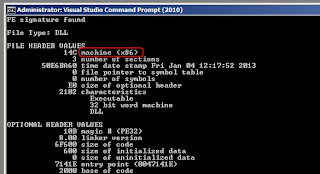
2. Execute the following: "dumpbin /headers mydll.dll" (of course replacing 'mydll.dll' with your assembly filename
3. Check the FILE HEADER VALUES and look for the value behind machine (x64 = 64-bit and x86 = 32-bit)

Wednesday, April 17, 2013
XMLNodeReader problem: The specified type was not recognized
// Solves the "The specified type was not recognized: name='##', namespace='##', at ..."
    // Came across this when trying to serialize an object of a custom type
    // It is caused due to a missing namespace reference (for some reason, the LookupNamespace method in the reader
    // does not return a string from the NameTable)
    public class XmlNodeReader2 : XmlNodeReader
    {
        public XmlNodeReader2(XmlNode node)
            : base(node)
        {
        }

        public override string LookupNamespace(string prefix)
        {
            return NameTable.Add(base.LookupNamespace(prefix));
        }


    }
source:http://coderstuff.blogspot.nl/2005/10/xmlserializer-bug-when-xsitype-is-used.html
Tuesday, February 19, 2013
Retrieving a resource key in a custom LayoutsPageBase page used in SP2010
1. Create the following property in your aspx.cs file:
2. Create the following method which will return the requested value stored in the .resx file by looking up the resource key
3. Good to go. Say you would need to populate a label in the Page_Load event with a string stored in the resources file with a key called 'MyLabelText'; you can then achieve this as follows:
protected Type ResourceType
{
     get
     {
          return typeof(MyResources); // replace 'MyResources' with your own resources file
     }
}
2. Create the following method which will return the requested value stored in the .resx file by looking up the resource key
protected string GetResourceString(Type resourceType, string resourceKey)
{
     return SPUtility.GetLocalizedString(string.Format("$Resources:{0}, {1}", resourceType.Name, resourceKey), resourceType.FullName, getLanguage);
}
3. Good to go. Say you would need to populate a label in the Page_Load event with a string stored in the resources file with a key called 'MyLabelText'; you can then achieve this as follows:
protected void Page_Load(object sender, EventArgs e)
{
     lblMyLabel.Text = GetSourceString(ResourceType, "MyLabelText");
}
Thursday, February 14, 2013
How to refresh parent page after closing a SP.UI.ModalDialog
var options = {
url:'/_layouts/YourAspx/YourPage.aspx',
title: 'Your Application Page Title',
allowMaximize: false,
showClose: true,
width: 700,
height: 260,
dialogReturnValueCallback: RefreshOnDialogClose
};
SP.UI.ModalDialog.showModalDialog(options);
Key here is the callback function; set it to RefreshOnDialogClose. Dead simple ;-)
Monday, December 3, 2012
How to display live server side processing/messages in a browser
How to display live server side processing/messages in browser.
Use this in case the webpart/application invokes a long running processes. This way the user will continuously be updated on the progression of code execution. In my particular case I'm using a textbox to pass messages onto but feel free to replace it with any other type of control, such as a progression bar. You can make it as fancy as you want, sky's the limit. The trick is to create an iframe, in which you embed the application page that actually calls the long running process. So you'll need a few things here
- A parent .aspx page with a textbox ('txtLogs')
- An 'child' .aspx page ('LongRunningOp.aspx') which will execute the code. The page itself will not contain any controls, just code behind
- An iframe to embed that child .aspx within the parent page
- An update function to update the textbox, which will be called through the child .aspx page
Creating the iframe will be accomplished by using the following piece of code
function BeginLongRunningOp() {
var iframe = document.createElement("iframe");
// set the source to the .aspx, in this example it can be found in the layouts folder of the 14
// hyve as i created this for a SP2010 webpart
iframe.src = "/_layouts/CodingNCrap/LongRunningOp.aspx";
iframe.style.display = "none";
document.body.appendChild(iframe);
}
Calling this function from the parent page will open the child page and start the execution. You will also need an additional function to update the textbox as code is execution:
function UpdateProgress(Message) {
var logWindow = document.getElementById('<%= txtLogs.ClientID %>');
logWindow.value = logWindow.value + Message;
}
Last thing needed to make this work is to go to the code of the child .aspx page and add the following line to your method that will make the update:
protected void UpdateProgress(string Message)
{
try
{
Response.Write(String.Format("< script>parent.UpdateProgress({0});< / script>", Message));
}
catch (Exception exc)
{
// your exception handling logics here
}
}
Monday, October 22, 2012
Finding site column used anywhere in your web application
Little powershell script to find out where your fields are currently being used in the web app
$solutionWebApplication = "http://yourSPurl/"
$fieldTitle = "ActiveConfig" #DisplayName
$fieldGroup = "Custom Columns"
$spAssigment = Start-SPAssignment #Use to dispose SPWeb safely
$spWeb = Get-SPWeb $solutionWebApplication -AssignmentCollection $spAssignment #Get SPWeb Instance
foreach ($field in $web.AvailableFields)
{
if($field.Group -eq $fieldGroup -and $field.Title -eq $fieldTitle)
{
$field.ListsFieldUsedIn() | ForEach-Object {
$web = $site.AllWebs[$_.WebID]
$list = $web.Lists[$_.ListID]
Write-Host "Web:" $web.Title " | List:" $list.Title " | ListUrl:" $list.RootFolder.Url " | StaticName:" $field.StaticName " | FieldID:" $field.ID
}
}
}
Tuesday, October 16, 2012
Finding site column used in content type by querying content db
Exception calling "Delete" with "0" argument(s): "Site columns which are included in content types or on lists cannot be deleted. Please remove all instances of this site column pri
or to deleting it."
ughh..
there are myriad approaches to hunt down that damn column, for example by using powershell. here is an alternative, directly querying the content db
or to deleting it."
ughh..
there are myriad approaches to hunt down that damn column, for example by using powershell. here is an alternative, directly querying the content db
SELECT
     ct.ContentTypeId            [ContentType ID]
,    Definition                  [ContentType Definition]
,    ct.DeleteTransactionId      [ContentType DeleteTransaction]
,    ctu.ListId                  [List GUID using CT]
,    l.tp_Created                [List Creation Date]
,    tp_DeleteTransactionId      [List DeleteTransaction]
,    tp_FeatureId                [Feature GUID]
FROM
     ContentTypeUsage             ctu
     INNER JOIN dbo.Webs          w  ON ctu.WebId         = w.Id
     INNER JOIN dbo.AllLists      l  ON ctu.ListId        = l.tp_ID
     INNER JOIN dbo.ContentTypes  ct ON ct.ContentTypeId  = ctu.ContentTypeId
WHERE
     ct.Definition LIKE '%your column%'
Friday, August 17, 2012
Splitting key-value string using LINQ
Time has come to get down-and-dirty with LINQ! For an app i'm building, i need to store an array of key/value pairs in a single string. It consists of an ID and a folder path, which are separated by use of a semicolon delimiter. The actual pairs are then separated using a pipe. Here is an example:
I created the following method that returns a Dictionary object:
Here's a full working console example:
string folders = @"32;c:\|48;c:\code|52;c:\program files|";
I created the following method that returns a Dictionary
        public static Dictionary<int, string> GetFolders(string folders)
        {
            string[] x = folders.Split(new[] { '|' }, StringSplitOptions.RemoveEmptyEntries); // first retrieve a string array of all the pairs

            return x.ToDictionary(y => Convert.ToInt32(y.Split(';')[0]), y => y.Split(';')[1]); // second stage of splitting
        }
Here's a full working console example:
using System;
using System.Collections.Generic;
using System.Linq;
using System.Text;

namespace ConsoleApplication1
{
    class Program
    {
        static void Main(string[] args)
        {
            string folders = @"30;c:\|48;c:\code|99;c:\Program Files";
            Dictionary<int, string> KeyValuePairs = GetFolders(folders);
            foreach (KeyValuePair<int, string> pair in KeyValuePairs)
            {
                Console.WriteLine("Key: '" + pair.Key + "', Value: '" + pair.Value + "'");
            }
            Console.ReadKey();

            /* Results:
             *
             * Key: '30', Value: 'c:\'
             * Key: '48', Value: 'c:\code'
             * Key: '99', Value: 'c:\Program Files'
            */
        }

        public static Dictionary<int, string> GetFolders(string folders)
        {
            string[] x = folders.Split(new[] { '|' }, StringSplitOptions.RemoveEmptyEntries); // first retrieve a string array of all the pairs

            return x.ToDictionary(y => Convert.ToInt32(y.Split(';')[0]), y => y.Split(';')[1]); // second stage of splitting
        }
    }
}
Subscribe to:
Posts (Atom)